6FPS V8#10: Buying Binoculars for Birds
E-mail: chuqvr@gmail.com • Site: https://chuq.me
BlueSky: (https://bsky.app/profile/chuq.bsky.social)
Know someone who might want to subscribe?
Want to see previous issues? Visit here: chuq.me/6fps
Welcome to the new issue of 6FPS.
As I write this, we’re gearing up for vacation, spending some time out on the Oregon coast. The plan is to mostly not have a plan, but we’re spending a few days in Bandon (my first visit in a long time), Newport (a long time favorite place of mine) and Seaside. I finally decided to check out the Best Western in Seaside. When Laurie heads out here solo, she typically stays in Cannon Beach and when I do this, I’ll stay in Astoria. Neither of us have spent a lot of time in Seaside, so this is a chance to explore it a bit more, but still have good access to the entire region, up to Long Beach.
Each of these three places gives us access to a lot of interesting birding and photography options, but we are mostly not doing much planning ahead of time. Mostly this is a chance for us to unplug and relax and just enjoy the time and the company.
Unexpected Projects
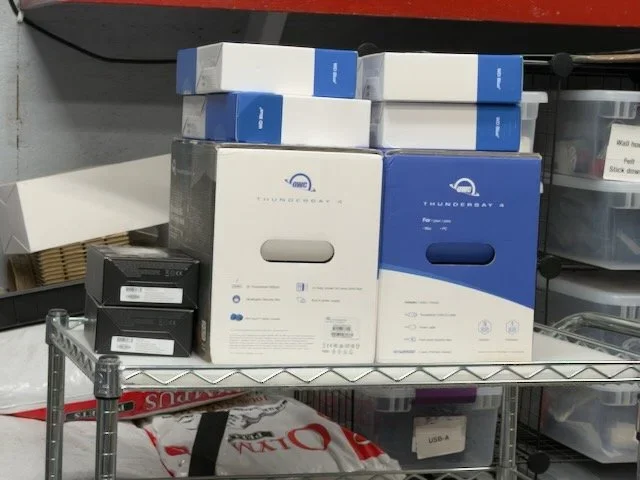
I ended up spending a couple of days (and a chunk of money) on an unexpected project. I noticed that the disk drive on Laurie’s iMac was showing a red light, which is, well, bad. On the plus side, it was a mirrored RAID drive, but one of the drives failed, so the data was still available, but a second drive failure would have been unfortunate.
I have also been considering retiring my Synology NAS in favor of moving the data into a RAID attached to the Mac Studio in my office. I ultimately decided that if I was going to upgrade the drives on Laurie’s Mac, I might as well do mine as well, and do both of them right.
So what you see in the picture are a pair of Other World Computing ThunderBay 4 Bay RAID Thunderbolt RAID enclosures, and a whole bunch of drives. This allowed me to shift from RAID 0 (two drive mirrors) to RAID 5, spread across four drives, with the ability to hot swap any drive that might fail. Mirror protects against a single drive failure, but any replacement drive has to be the same size as what is replaced. RAID 5 still has issues with two drives fail at the same time, but drive can be replaced with any size drive, allowing incremental upgrades over time if you need more space. This won’t be an issue for either of us for a while, since we both now have about 10 TERAbytes of storage space to play with, but I prefer the flexibility and management of these OWC units to what we both had.
I had a couple of reasons to retire the Synology in favor of this new setup: first, I wanted to move to RAID 5, which is impractical on a 2 bay NAS. Second, a Synology isn’t a Mac, so administering is different — not bad, just different — and I found myself always grumping about having to figure out how to set something up the way I wanted it. And third, any data on the NAS isn’t accessible to my tools, and to things like Apple’s Spotlight, so it’s a lot less finable, and with the emphasis by Apple on being able to leverage your historical data, I’m curious how well that will work for me in practice, but if that data is hidden away on a NAS, it doesn’t matter. None of that was a reason to make the change now, until I had to for Laurie’s Mac because of the drive failure. And as long as I’m fixing one, well, at least now everything is Mac based and using the same tools and software (OWC’s Softraid), simplifingin my administrative life.
It turns out the drive that failed in Laurie’s RAID was manufactured in 2019, so it had been in service for over six years, and was overdue for replacement — I typically try to plan to replace spinning drives after 4-5 years, because replacing them before they fail is a lot less stressful than after. The drives in my NAS were 3 1/2 years old, so also heading into replacement territory, but I could have waited another year before starting to stress out about them. Oh, and my NAS drives were slow, 5600RPM drives, and I always regretted cheaping out that way.
Now? I don’t have to think about it for a while, and if a drive doesfail, Softraid does a good job of notifying us, and the replacement is straightforward. The joy of using well-built, well-engineered tools.
But yeah, buying that much disk right now? Not fun. But worth it.
xOS 27 initial thoughts
It’s fall, which means it’s new iPhone time, and the annual big release of the new system software for everything. As usual, I updated all my things to the xOS 27 on release day — after waiting about six hours in case there was some issue that caused Apple to pull them back again.
When I install a big release like this, the first thing I like to do is, well, nothing. Just upgrade and see what I notice as different, and whether anything breaks. The short answer: nothing broke, and for the most part, the upgrade from IOS 26 to 27 made no real change. I did feel that everything on the phone felt just a bit cleaner and crisper, but it was very subtle.
I did not buy a phone. I did buy a 17 Pro a month or so ago, because I was worried about how much prices would go up this year and I wasn’t convinced the 18 Pro would be worth it. Do I regret that choice? No. I like the 17 Pro just fine, and the 18 is an improvement, but there’s nothing there that makes me wish I waited. That said, the pricing of the phones wasn’t as painful as I worried they might be, an if I had waited, I would have been happy with an 18 Pro as well.
I did buy a watch, a new Burgundy series 12 steel model. I’ve been disappointed with battery life in the watches recently, and IOS 26 was evidently part of this, and I had hopes that WatchOS 27 and a series 12 would solve this. Did it? Well, my series 11 on WatchOS 26 consistently showed about 40% power left at 7PM, and if I didn’t give it some charring time, would be under 20% at bedtime, often in low power mode. So far, since moving to the new watch and OS m27, I’m seeing power levels of 70% at 7PM, and around 55-60% at bedtime. That’s a huge improvement, and I’m quite happy.
They also resolved a big gripe I had with the watch, not being able to set specific complications (like Medications and Timer) as favorites, but having to search for them in the list every time I wanted them. WatchOS 27 builds a priority screen of your most commonly used complications, so these are now always right at my fingertip when I want the, and I can’t be happier.
The burgundy, like so many Apple colors these days, is very dark, and probably looks black most of the time to most people, but there’s a subtle reddish tone to it that I like, but it’s something I think only I will ever notice. That kind of defines Apple’s color schemes these days for better and worse.
Overall, though, I’m quite happy with the xOS 27 releases. Stable, solid and much improved power usage on the watch. I haven’t yet dug into the new Siri or Apple Intelligence features, but I’m curious to see what, if anything, I find useful with them.
The Socials
Last months I pondered about diving back into social media and asked for thoughts on whether this was a good idea or not. That led to a number of interesting discussions, so thank you to everyone who shared their thoughts with me.
I have ultimately, and a bit reluctantly, decided that it does make sense for me at this point in my life. My mindset has shifted back to the feeling like I have things I want to share — and will have some value to others (honestly, if it only mattered to me, why bother?)
I hate social media bullhorns (loudly telling, never listening), and I’ve long tried to live with the idea of adding to a conversation, not just joining it, and so much on the socials these days are people trying to show how smart and important they are, and that’s one reason I more or less pulled out
But I’m going to give it a try, look for the places where I can avoid the noisiest and nastiest that exist out there, and find ways to build conversations again. On thinking about it (and I hate to say this, honestly) the place where I most consistently find that is on Facebook, much as I dislike the idea of contributing to anything Meta does — and it seems to me my photography could benefit from going back to Instagram. So those are the two social sites I’ll be exploring and experimenting with and see what happens.
There’ll be more on Bluesky as well, which is a perfectly fine site, but not one I really love — I’ll need to spend some energy on it finding the niches there I really want to be part of. I also have a few private discords I’ve been ignoring for months, and I think that’s a place I’m more likely to find some of the community I’m hoping for. And, maybe, I need to take a look at Reddit again; I’m still pondering that one.
We’ll see how it goes, and I’ve got to sort out what I want to do with each system, but I now have a direction to aim myself at and see what happens.
In the Workshop
The spice racks are done and installed, and are a big improvement over what washer before. Very happy with the end result.
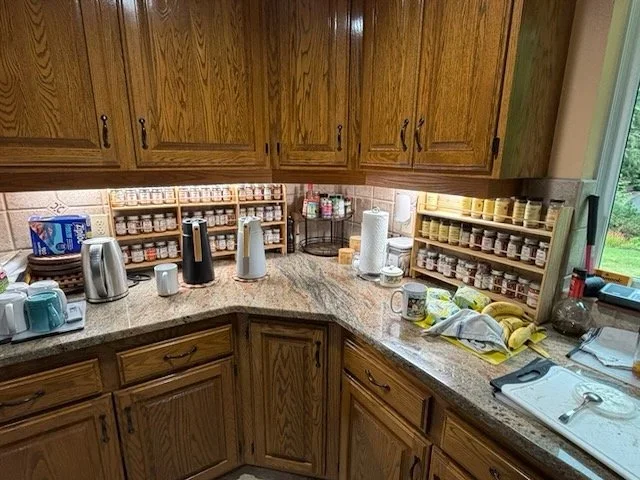
Instead of starting a new project, I spent some time working on some shop infrastructure mini projects. These were mainly responses to thinking about what was annoying me while working in the shop.
I ended up building some organization under the table saw for all of the table saw bits and pieces; they were living in a drawer — including my safety gear, and I needed it very accessible so I’d use it. Now, the push sticks are right there and easy to grab, and all of the other accessories, like the crosscut sled, are always with the saw so I’m not tempted to just make a “quick cut'“ in an unsafe way.
The second annoyance were the various screw and part boxes I had stacked up in some shelves. Invariably, whatever I needed was in the third box down, meaning I had to pull and stack things together to it. I ended up building two storage spots, one in the bench, and one in the rolling cart I use mostly to hold things I need to put somewhere while working on stuff — it’s literally that spare table so I’m not fighting for space on the bench. The bench has room for six of my standard (3 inches deep) boxes, and the cart has room for six more, along with six deep (5 inch deep) boxes. That gives me four empty boxes, which I’ll fill up with stuff over time (for a good discussion on storage strategy, check the YouTube link below).
I also needed to re-think the small dust collector; it was a jumble of hoses and things, and hard wired into the miter saw and the belt sander, but I realized I needed to also be able to attach it to the router table, the track saw and the sanders — so it become a cart on casters, and it now uses magnetic connectors, so I can connect it to any device as long as I build a hose that can connect to the tool. I’ll be building the rest of the hoses down the road, but for now, it’s again dedicated to the miter saw and sander.
And finally, I needed to organize my sandpaper, which was making me crazy every time I sanded something, so I picked up a file folder organizer mounted it to a board, and mounted that to the wall via a French Cleat, which makes it portable so I can pull it off the wall and carry it out to my work table where I sand.
All of this has cleared up a fair bit of storage space, which I don’t currently need (which is nice).
What’s up next? I’m not really thinking about it until after vacation, so right now, I’m not sure. But I have a thing or two I want to try to make before Christmas, and so I’ll be thinking about that soon.
My Favorite Thing (this month)
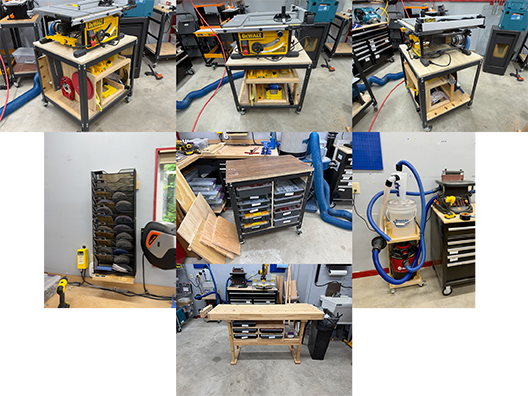
This month my favorite thing is an iPad case I just bought. I’ve been looking for a really good case for my iPad for a while — I used Apple’s for a good while, but never loved it. I started looking around for a leather case, one that would include the Apple Pencil.
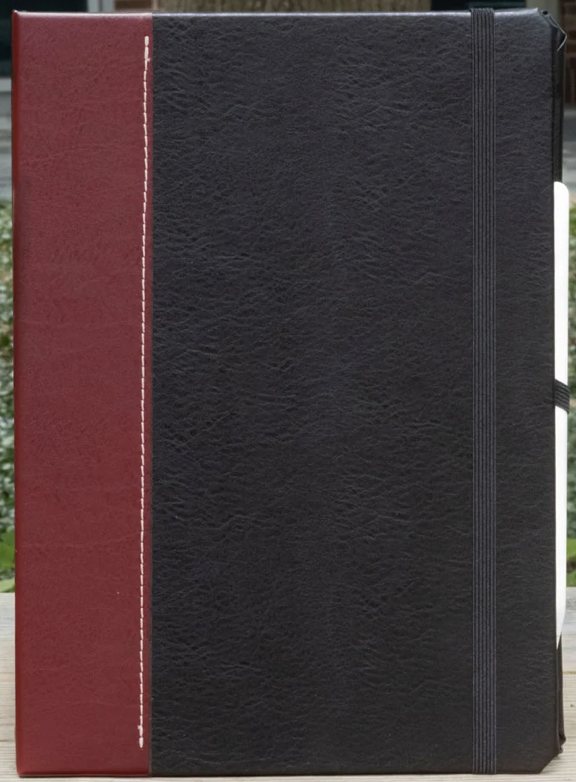
I tried a couple off of Amazon — by the way, “vegan leather” in fact means plastic (sigh), and I’ve used one for a few months where the leather was decent and it had a nice built in holder for the pencil (that charged it while seated), but it always felt a bit heavy and was awkward to use in the case. So I ultimately decided to start looking around again.
I really wanted a nice, leather case, but I also didn’t want to spent $200 on it. I ultimately ran across the case above, which is from a company called Dodocase. Their executive leather case has a really nice, classic look, a holder for the pencil, and having used it for a couple of weeks now, feels lighter carrying it around than my previous one, and works nicely both on a desk and hand held. So I’m really happy, and it’s only $79, with really high quality and fit and finish.
Apropos of absolutely nothing…
I was doing my monthly link check on the web site, and I happened to look at the overall site stats for chuq.me. As of this writing, the site contains 859 separate pages and 24,336 links to things. Amazing the kind of thing you can build when you do it slowly over a very long period of time. And while digging back into the past to see if I could figure out what the oldest blog post is, I ran across this fun piece, originally posted on April 1, 2006 — 20 years ago: What I do for a living.
This blog has lived in some form or another since around 2001, 20-some years ago, although it has content dating back into the 1980’s. And I plan to continue writing here until I actually figure out how to be good at it….
Digging into this a bit made me realize old blog posts submerge the way SquareSpace organizes them. I tried asking Claude what the oldest blog post was, and it had to give up because it got rate limited; I asked the new Siri, and it came back and told me about one in 2006, which isn’t correct, but under the circumstances, probably as good as it could find. And so… I have a new project to figure out how to surface the old content again — I think I know how to make it happen, but I’ll need to experiment a bit…
See you next issue!
What’s New From Chuq
Buying Binoculars for Birds
I’ve been pondering this for a few months, but I finally pulled the trigger and upgraded my binoculars. I spent a little over $500 for a pair of Nikon Monarch M7 10x42 peepers.
My previous pair, a pair of Vortex Viper 8x42 that I bough in 2021 after we moved north, now live in the house where we use them to get closer look at what’s on the feeder and around the place, and the pair it replaces, some Vortex Diamondback 8x35 now live in the garage and I use them for my point counts around the place, but I’m likely to donate them down the road.
What do all those numbers mean? Most binoculars are described by a pair of numbers: 8x42, for example. The first number defines the strength of them, or how much they magnify the image. An 8x pair is about he equivalent of a 400mm camera lens, and a 10X is about the same as a 500mm lens. So the higher the magnification, the closer the bird you’re looking at will look.
There are downsides to the higher magnification, though: one is size and weight — they’re going to be heavier and bigger. The other is that because your field of view is smaller (you see a narrower slice of what’s in front of you), it’s harder to get the bird in view and harder to keep it in view as it moves around. This can be managed somewhat with practice, and yes, I am suggesting you want to practice putting the binoculars to your eyes and getting a bird in view — it’s a learned skill that can really help when you’re rushing to get a look at a bird.
The second number, the “42” part, indicates the size (in millimeters) of the glass in the front of the binoculars. 42mm front glass is larger than 35mm glass, and the larger glass optic means more light passes through and into your eyes. This generally means that a 42mm front lens will mean better seeing in poor light than a 35mm one.
There’s a third aspect to considering a pair of binoculars, and that’s the quality of the optics used. This is where you start seeing the huge difference between buying an inexpensive pair of binoculars. A basic pair, like the Vortex Triumph 10x42 will only cost you $100, but the Swarovski Optik NL Pure 8x32 costs over $3000.
So, why did I upgrade? It’s a bit complicated, but I kept bumping into the limitations of my old set — I’m doing more sea watch type birding, where I’m trying to get a good look at birds that are fairly distant, and I just wasn’t able to see the details on the bird I needed, especially here in Washington on those grey, cloudy mornings.
The new binoculars? I definitely notice the difference; when I’m starting at a gull hundreds of yards offshore, I’m now seeing small details that were lost to me with my old pair; for instance, the Bonaparte’s Gull we get large flocks of in the winter have a small black dot on the side of the head. With my old pair I couldn’t see that detail, with my new Nikon’s I can. On a grey, cool day they definitely make a difference (and I did test them head to head at the same time to make sure what I was seeing was an objective change).
Are you someone getting interested in birds (or mammals, or anything else where binoculars would be useful) and considering buying binoculars, here’s my advice:
First, you need to spend some money, but you don’t need to spend a lot of money. I would not buy any with front optics smaller than 32mm, because most of them are of poor quality and the small entrance restricts light, so they don’t perform that well in poor conditions. An exception is if you need a really small pair for travel where you want something that’ll fit in a jacket pocket — then consider one of the 25mm travel pair, but understand there are tradeoffs here.
Don’t go for an opening larger than 42mm; they get big and heavy and you’ll hate carrying them around. Binoculars larger than 50mm will realistically require a tripod, and I would suggest buying a scope instead.
Stick to known brands: I like Vortex, Nikon and Celestron brands for the affordable mid-range models. I think you can get some really nice sets for $200-300. If you spend less, you’re likely to find you are outgrowing the capabilities of them fairly quickly and will be thinking of upgrading. Spending more than that, if your budget allows go right ahead, but I just don’t think it makes sense to start out with really expensive gear — wait on the big expenditure until you’re sure this is something that warrants it.
For me, the sweet spot for beginner optics is something like the Vortex Diamondback HD 10x42 (about $250) or the NIKON Monarch M5 8x42 (about $270). I used the earlier version of the Vortex and quite liked it. Either of these would be a great started pair that will give you years of use before you might consider upgrading.
What about a spotting scope? I wouldn’t to start; but they are a useful addition as you get more serious about your bird watching. Note that scopes can’t replace binoculars, you need them to locate birds, and then use the scope to add more magnification — and scopes require a tripod, so there’s more to carry around, and the weight adds up. I only haul out my scope about half the time these days.
And that, of course, is my current conundrum: I’ve found myself running into the limits of my current scope, and the improvement with the new binoculars is making that more obvious to me. My current scope (the Vortex Diamondback HD Spotting Scope 20-60x85 Angled, about $550) is really pretty good, but I keep finding myself bumping up against the limits of my ability to pull out detail on far off birds. So do I upgrade? and to what? I would love to pick up one of Kowa’s scopes, but I don’t see myself paying $3000 for one. I might even argue it makes more sense to buy a longer telephoto for the Sony setup, whether it’s the Sony 200-600 (about $2100) or the Sigma 150-600 as an alternative. I’m not sure what makes the most sense here, or whether I really need it (and in some ways this boils down to a need vs want decision). I find myself leaning towards a lens upgrade, but not enjoying the thought of carrying it….
For now, I’m not making changes, but it is something I’m going to ponder for a while…
Recent Photography
As I create new images and re-process older ones, I post them on my site in the Recent Work area.
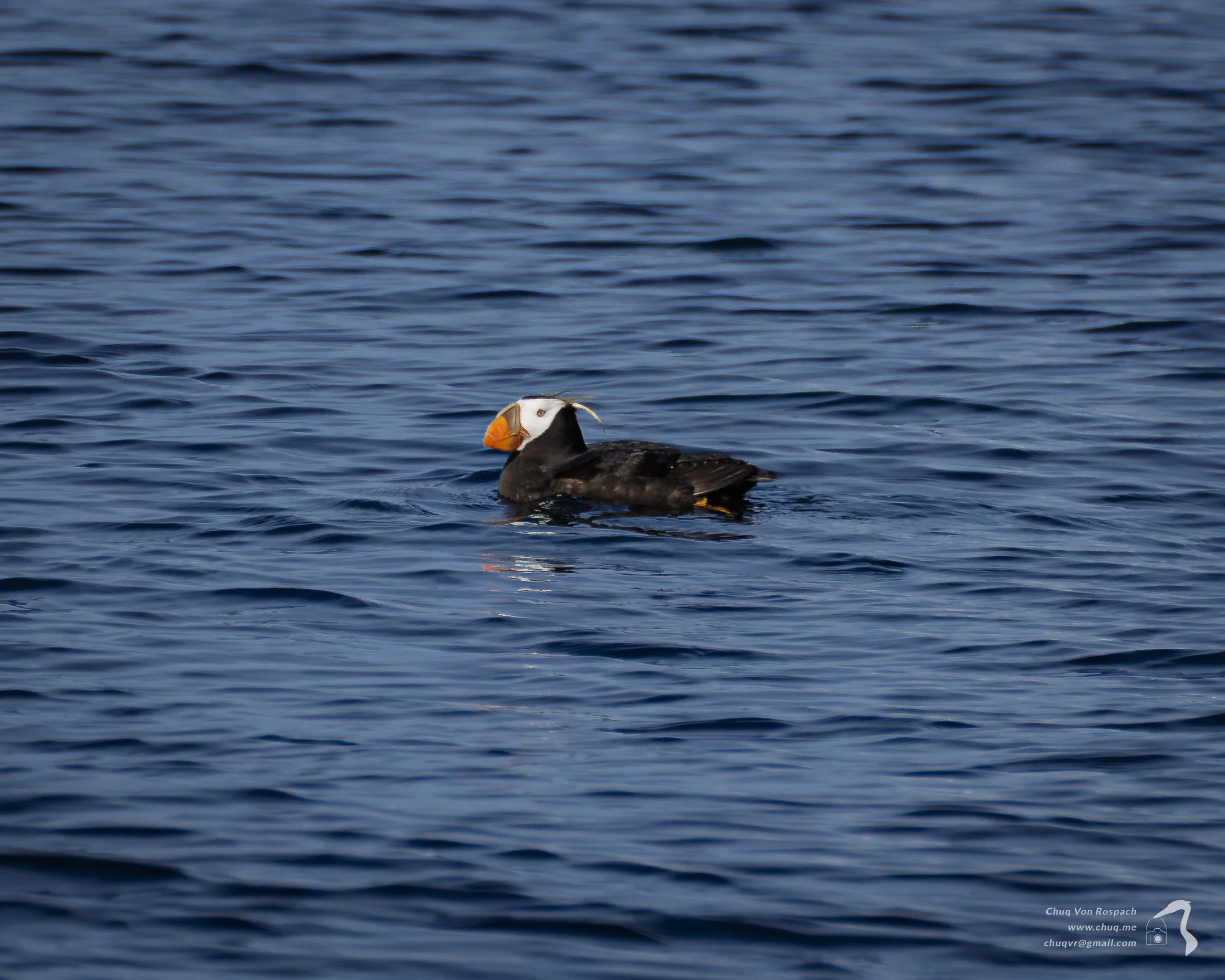
Not much camera work this month, but I finished up the processing of the images on my Puffin Run that I mentioned last month (see the link above for all of the images). Laurie and I are spending some time on the Oregon Coast this month for some birding and, hopefully, photography, and we’ll see what happens.
For Your Consideration
Birds and Birding
Photography
2026 Natural Landscape Photography Awards 2026 Competition Results and Gallery
The Phenomenal Winners of Bird Photographer of the Year 2026
Science and Technology
Apple is working on a way to authenticate that a photo came from an iPhone camera
How 100 days of record ocean heat is reshaping life in and around the seas
Interesting Stuff
Free Wallpapers just for Subscribers
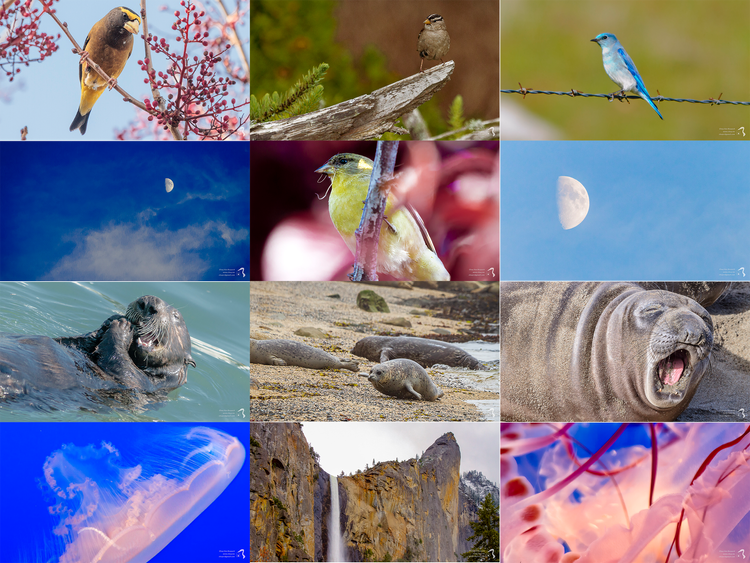
New Wallpapers (August, 2026). A new set of 12 wallpapers are now available.
You can download this new set from the 6FPS Secret Wallpaper. The previous set of wallpapers are now with the full public set at Public Wallpaper page.
These are available only to you, my favorite people who happen to be subscribers to 6FPS. The previous set of images I released here are now available to the general public.
Download an E-book
I have eight e-books available. All are free for you to download and read with no obligation. You can download them from my e-book page on the web site.
These are the books that are available:
Birding 101: Hints and Tips for the New Birder
Merced National Wildlife Refuge
And the Geese Exploded: A Life With Birds
Birds of Santa Clara County
2021.1: A Year of Transitions
2020.1: Images from the year when Covid changed everything
2019 (1)
2019 (2)
About 6FPS
6FPS (Six Frames Per Second) is a newsletter of interesting things and commentary from Chuq Von Rospach (chuqvr@gmail.com). 6FPS is Copyright © 2025 by Chuq Von Rospach. All Rights Reserved.
Coming out monthly on the 2nd Monday of the month, I will place in your inbox a few things I hope will inform and delight you. There is too much mediocre, forgettable stuff attacking your eyeballs every day you're online; this is my little way to help you cut through the noise to some interesting things you might otherwise not find.
And with that, I'll see you in the next issue. I'd love feedback on this, what you like, what you want more of, what you want less of. And if you have something interesting you think I might want to talk about, please pass it along. Until then, take care, and have fun.
Where to Find Chuq
Email chuqvr@gmail.com
Stay updated by subscribing to my 6FPS email newsletter
E-mail: chuqvr@gmail.com
Bluesky (@chuq.bsky.social)